Arcade Repair Masterclass
Classic full-size cabinets and game boards, arcade CRT monitors, and modern LCD/computer-based systems. Learn to identify the installed hardware, explain faults and prepare a documented repair plan.
Arcade CRT Monitor Diagnosis
Display identification, signal-path reasoning, model dossiers, qualified repair planning and restoration verification.
System map and practical route
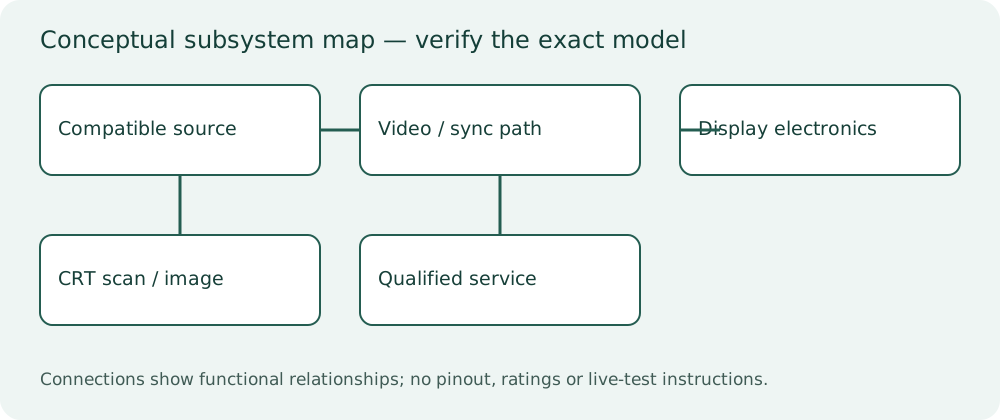
Original conceptual block diagram. Connector assignments, voltage limits and service procedures must come from the exact model manual.
Begin with the two free previews. Work through the mini courses, keep a repair-planning portfolio, then submit the capstone worksheet for qualified review. Quizzes record written learning only.
Monitor Identity & Safe Diagnostic Planning
Four focused lessons with original diagnostic cases, Q&A, checks and printable planning worksheets.
4 lessons • included in this full track and the complete program
Open mini course →View price & enrollPicture Symptoms & Fault Isolation
Four focused lessons with original diagnostic cases, Q&A, checks and printable planning worksheets.
4 lessons • included in this full track and the complete program
Open mini course →View price & enrollComponents, Alignment & Conversion
Four focused lessons with original diagnostic cases, Q&A, checks and printable planning worksheets.
4 lessons • included in this full track and the complete program
Open mini course →View price & enrollService Dossiers & Display Capstone
Four focused lessons with original diagnostic cases, Q&A, checks and printable planning worksheets.
4 lessons • included in this full track and the complete program
Open mini course →View price & enrollFind an arcade lesson, symptom or question
Search titles and learner questions. Lesson access follows your existing mini-course, full-track or complete-program purchase.
- Free preview: Identify an arcade monitor by chassis and revisionMonitor Identity & Safe Diagnostic Planning • Free sample
- CRT hazards, isolation and protective earthMonitor Identity & Safe Diagnostic Planning • Included lesson
- Raster, RGB and synchronization as separate functionsMonitor Identity & Safe Diagnostic Planning • Included lesson
- Free preview: Plays blind: a free diagnostic planning caseMonitor Identity & Safe Diagnostic Planning • Free sample
- Collapse, shutdown and repeated fuse failurePicture Symptoms & Fault Isolation • Included lesson
- Missing color, tint and signal-path isolationPicture Symptoms & Fault Isolation • Included lesson
- Geometry, linearity and sync faultsPicture Symptoms & Fault Isolation • Included lesson
- Burn-in, purity and convergencePicture Symptoms & Fault Isolation • Included lesson
- Capacitors, solder joints and evidence-led replacementComponents, Alignment & Conversion • Included lesson
- Flyback, output stage and compatible partsComponents, Alignment & Conversion • Included lesson
- Brightness, focus and owner expectationsComponents, Alignment & Conversion • Included lesson
- CRT-to-LCD conversion without losing the gameComponents, Alignment & Conversion • Included lesson
- Monitor model dossiers: Wells-Gardner and alternativesService Dossiers & Display Capstone • Included lesson
- Monitor diagnosis worksheet and escalationService Dossiers & Display Capstone • Included lesson
- Display repair verification and burn-in preventionService Dossiers & Display Capstone • Included lesson
- Monitor capstone: source or display?Service Dossiers & Display Capstone • Included lesson
No matching lessons. Try a shorter symptom or circuit name.
Free preview: Identify an arcade monitor by chassis and revision
Learning goal: Resolve assembly identity and electrical compatibility before selecting parts.
The cabinet title does not identify its monitor. A CRT tube, frame and chassis may have been changed independently. Scan capability, input signal, supply requirements and isolation needs depend on the assembly. A familiar-looking flyback or board shape is not sufficient to select a replacement chassis.
Create an identity record from externally available labels and qualified photographs: chassis model, revision, tube markings, connector references and documented supply path. Match the manufacturer’s manual before service. Unknown assemblies remain off pending assessment. Never swap neck boards or chassis solely because connectors fit.
Diagnostic planning checklist
- Identify the actual assembly, not just the cabinet artwork.
- Record the applicable document and revision.
- Separate observation from inference.
- Define one discriminating next step within authorized competence.
- Preserve the original configuration and reversible changes.
- Verify the accepted repair scope and document remaining limitations.
Questions learners ask
Can I diagnose “identify an arcade monitor by chassis and revision” from one photograph?
A photograph can document appearance, labels and some visible damage. It normally cannot establish circuit condition, timing, compatibility or electrical safety. Use it as evidence in a model-specific record, not a replacement-part verdict.
What should I write before replacing a part?
Resolve assembly identity and electrical compatibility before selecting parts. List the competing hypothesis, the observation that would discriminate it, exact compatibility evidence and the post-repair verification.
What is the repair tip that saves unnecessary purchases?
Create an identity record from externally available labels and qualified photographs: chassis model, revision, tube markings, connector references and documented supply path. Match the manufacturer’s manual before service. Unknown assemblies remain off pending assessment. Never swap neck boards or chassis solely because connectors fit.
What if I am not trained for the next test?
Prepare the identity and symptom worksheet, leave hazardous equipment off and request the defined assessment from a qualified technician. Written theory does not establish safe practical competence.
Arcade service glossary
- Attract mode
- The demonstration shown while waiting for a player.
- Burn-in
- Persistent uneven phosphor wear in a CRT.
- Chassis
- The electronics assembly of a monitor; distinguish it from tube and frame.
- Checksum
- A calculated value used to compare stored data.
- Coin input
- The electrical credit request, distinct from mechanical coin acceptance.
- Convergence
- Alignment of color images in a color CRT.
- Daughterboard
- An additional board connected to a main logic assembly.
- Deflection
- The scanning system that positions a CRT image.
- DIP switch
- A physical bank of configuration switches.
- Edge connector
- A connector contacting pads on a board edge.
- ESD
- Electrostatic discharge that can damage electronics.
- I/O
- Input/output: interfaces to controls and peripherals.
- Isolation
- A specified electrical separation; not a guarantee of harmless equipment.
- JAMMA
- A cabinet/board interface convention; verify actual implementation and extras.
- Latency
- Delay between an input and its visible or audible effect.
- Logic probe
- A tool for observing suitable digital signal states within its ratings.
- Raster
- The scanned image area of a CRT.
- Reset
- A signal that establishes an initial system state.
- Ripple
- Variation superimposed on a supply level.
- ROM
- Read-only program or data storage.
- RAM
- Working memory that typically requires power to retain its data.
- Sync
- Timing information used to coordinate image scanning.
- Watchdog
- A system that can reset a machine when expected activity fails.
- Voltage drop
- A difference along a current-carrying path caused by impedance.
- Purity
- Correct beam landing on the intended color phosphor.
- Four-way restrictor
- A joystick gate intended to prevent diagonal directions.
- Rollback
- A documented route back to a known configuration.
- Acceptance matrix
- A written set of conditions for verifying agreed work.
Diagnostic case
A monitor frame says one model while the installed chassis label names another.
Fictional training case; the observations are not measurements from your arcade cabinet.
Practice task / worksheet
Produce a one-page worksheet for “Identify an arcade monitor by chassis and revision”. Record the equipment identity and document revision, three facts from the case, two competing causes, the safest next discriminating observation, the authorized work boundary and a measurable acceptance criterion. Explain why your observation would distinguish the causes. Do not perform internal work as part of this written exercise.
Printable diagnostic worksheet
- Model, chassis and revision
- _______________________________
- Symptom and when it occurs
- _______________________________
- Evidence versus assumptions
- _______________________________
- Three competing hypotheses
- _______________________________
- Documentation and qualified assessment required
- _______________________________
- Approved scope and verification criteria
- _______________________________
Check your reasoning
In this case, which decision is supported by the available evidence? A monitor frame says one model while the installed chassis label names another.
Resolve assembly identity and electrical compatibility before selecting parts. The case does not provide enough evidence for a universal component diagnosis. Record an alternative cause and verify the authorized scope before changes.
References and further reading
Original written lessons and fictional diagnostic cases. Manufacturer service procedures must be obtained for the exact equipment; linked manuals are not resold as course downloads.
- Midway Pac-Man Parts and Operating Manual (December 1980), original manual scan
- Midway original manual and logic-troubleshooting archive: select exact title and revision
- Nintendo original operations manuals: select exact cabinet and board revision
- Wells-Gardner manufacturer service manuals, schematics and troubleshooting guides
- Ultimarc J-PAC manufacturer installation and video compatibility documentation
- Ultimarc I-PAC2 manufacturer control-interface documentation
- MAME project documentation: ROM, BIOS, device and disk-image set structure
- MAME project troubleshooting and software-use FAQ
- Raw Thrills manufacturer manuals and service bulletins
- Raw Thrills Drift conversion manual: manufacturer fault tables
Save to Pinterest